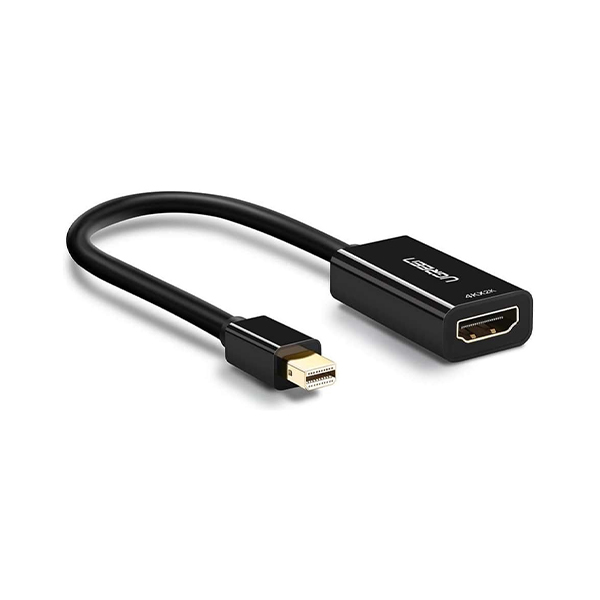
The UGREEN Mini DisplayPort to HDMI Adapter (Model 10461) is engineered to solve common connectivity challenges, providing a high-quality conversion path from a Mini DisplayPort or Thunderbolt port to an HDMI display. It is the ultimate solution for users needing to connect compatible PCs or graphic cards—such as those found in MacBook Pro, MacBook Air, iMac, Mac mini, Mac Pro, and various Windows laptops—to HDTVs, monitors, or projectors.
Designed for versatility, this adapter supports video resolutions up to 1920 x 1200 and 1080P (Full HD). Beyond video, it handles flawless audio pass-thru, supporting uncompressed digital 7.1, 5.1, or 2 channels, alongside uncompressed audio formats like LPCM and compressed formats such as DTS Digital and Dolby Digital. This robust audio/video capability ensures that your presentations and media streams remain uninterrupted.
For professionals and students, the UGREEN adapter allows users to extend or mirror their laptop display, transforming a standard workspace into an expanded setup for presentations or home theater viewing. Its durable construction and gold-plated connectors are designed for optimal signal transfer, guaranteeing stable and reliable performance across various demanding environments.
Compatibility is a key feature, supporting a wide range of devices including Apple MacBook models (2015 and newer), Microsoft Surface Pro 3 and 4 (for Windows 8 Pro), and numerous models from Dell, Lenovo, Acer, and HP. However, users should note that the adapter is not bidirectional, transmitting signals only from Mini DisplayPort to HDMI, and it is not compatible with Thunderbolt 3.0 or MacBook Pro released after 2016.
The adapter features a plug-and-play design, requiring no additional drivers or software. Its compact and lightweight build makes it highly portable, ideal for carrying in a bag for office work, classrooms, or home entertainment setups. When paired with an HDMI version 1.4 cable, the UGREEN Mini DisplayPort to HDMI Adapter provides a dependable, high-definition link wherever you need it.
thumb_up Pros
Supports high-definition 1080P video output.
Transmits both video and multi-channel audio (up to 7.1).
Highly compatible with Apple, Dell, Lenovo, and Microsoft devices.
Gold-plated connectors ensure optimal signal transfer.
Compact and portable design for easy travel.
thumb_down Cons
Not bidirectional (Mini DP to HDMI only).
Does not support Thunderbolt 3.0.
Not compatible with MacBook Pro released after 2016.
Requires a separate HDMI cable (sold separately).
Before purchasing, carefully verify your laptop's Mini DisplayPort/Thunderbolt port specifications to ensure compatibility, especially if you are using a newer model. Always ensure you have a high-quality HDMI cable to maximize the video signal quality for optimal viewing.
★★★★★
"The 1080P resolution is crystal clear, making it perfect for my office presentations."
★★★★★
"It handles both video and audio flawlessly, supporting the 7.1 channel pass-thru I needed."
★★★★★
"Compatibility was great; it connected easily to my MacBook Pro and projected perfectly."
★★★★★
"The adapter is very durable and the gold-plated connectors give me confidence in its longevity."
Video Reviews
Which Cable Do You Need To Connect a Mac To an External Display?
macmostvideo · 209,189 views
Syncwire Mini DisplayPort | Thunderbolt to HDMI 4k Adapter SetUp Manual Guide - Mac