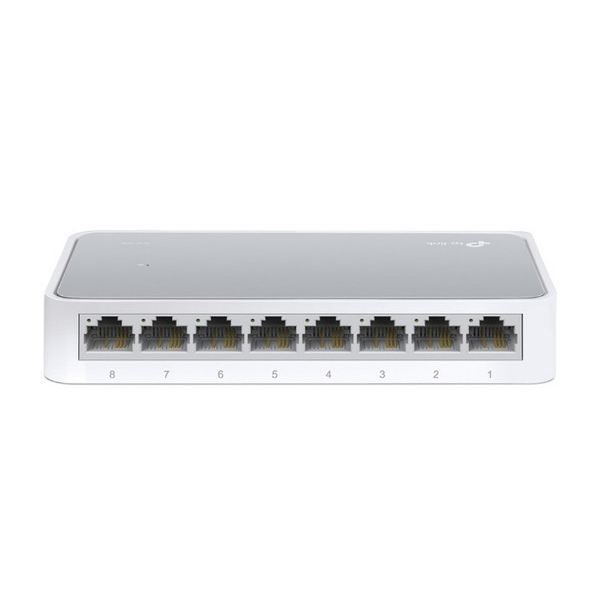
The TP-Link LS1008 LiteWave 8-Port 10/100Mbps Desktop Switch is an affordable and efficient solution for users looking to expand their wired network connections. Designed for simplicity, this unmanaged switch allows you to connect multiple devices—such as computers, printers, webcams, and IPTVs—instantly without the need for complex configuration.
Equipped with eight 10/100Mbps Auto-Negotiation RJ45 ports, the LS1008 supports Auto-MDI/MDIX, meaning you don't have to worry about whether you are using a straight-through or crossover Ethernet cable. Data reliability is ensured through IEEE 802.3X flow control, providing a stable connection for your essential devices.
Sustainability is built into the hardware via Green Ethernet technology. The switch automatically adjusts power consumption based on the link status and cable length, helping you reduce your carbon footprint and lower energy bills without sacrificing performance.
Built for any environment, the LS1008 features a compact plastic casing and a fanless design, ensuring completely silent operation. This makes it an ideal choice for noise-sensitive areas such as school dormitories, home offices, or small business setups.
Whether you are setting up a basic home surveillance system or simply need more ports for your desktop peripherals, the TP-Link LS1008 provides a seamless, plug-and-play experience that brings a 'lighter network life' to your workspace.
Specifications
usb
8× 10/100Mbps RJ45
Ports
info
Auto-Negotiation, Auto-MDI/MDIX
Port Features
info
IEEE 802.3i, 802.3u, 802.3x
Standards
info
IEEE 802.3X
Flow Control
info
Fanless
Cooling
info
Plastic
Casing
info
Plug and Play
Installation
info
Green Ethernet
Technology
thumb_up Pros
Extremely easy setup with plug-and-play functionality
Silent operation due to fanless design
Energy-efficient power consumption
Compact desktop form factor
thumb_down Cons
Limited to 100Mbps speeds (not Gigabit)
Plastic casing may be less durable than metal
The TP-Link LS1008 is ideal for basic internet browsing, printing, and light smart-home connectivity. However, if you are transferring large files between computers or have a high-speed fiber connection exceeding 100Mbps, you should consider a Gigabit switch (like the LS1008G) to avoid network bottlenecks.
★★★★★
"Perfect for expanding my home network without any technical setup—just plugged it in and it worked."
★★★★★
"The fanless design is great; I have it on my desk and I can't hear it at all."
★★★★★
"A very affordable way to get more wired ports for my printer and smart TV."
Video Reviews
TP Link 8 Port Switch Unboxing & Setup | TP Link 8 Port Network Switch | TP Link LS1008 Switch
Wasay Tech Tips · 65,580 views
TP Link TL-SG108E 8 Port Smart Gigabit Switch (Unboxing Review + Installation)