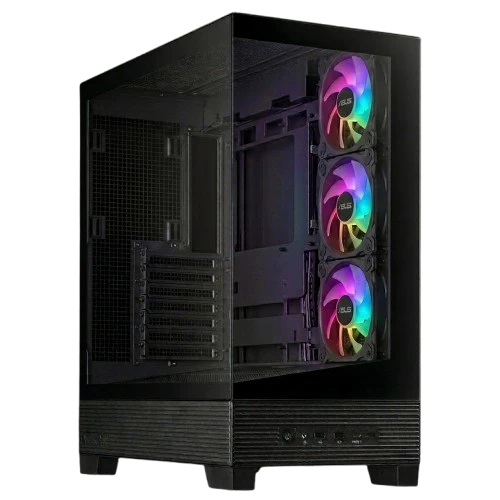
The Asus A31 Case BTF Supported is engineered for the modern DIY PC builder who values a clean, minimalist aesthetic without compromising on performance. Its standout feature is the native support for BTF (Back-to-the-Future) motherboards, such as the ROG MAXIMUS Z790 HERO, allowing connectors to be hidden on the back of the board for an incredibly tidy interior.
Designed with a panoramic perspective, the case utilizes dual-sided tempered glass on the front and left side, providing an unobstructed view of your hardware. This is complemented by a unique 8° angled base, which not only adds a touch of elegance but is functionally designed to enhance airflow efficiency and widen the viewing angle for a more immersive experience.
Cooling flexibility is a priority in the Asus A31. It supports massive 360mm radiators at the top with 80mm of clearance, allowing for thicker radiators and larger fans. The chassis is compatible with graphics cards up to 380mm in length (including the RTX 4090) and CPU air coolers up to 165mm in height. Depending on the model, such as the A31 Plus, it comes pre-installed with four 120mm ARGB fans, including inverted blades on the side to maintain visual appeal while optimizing intake.
Cable management is simplified with a dedicated 34mm wide space, ensuring that wiring remains tucked away and organized. The front I/O is up to date with modern standards, featuring a USB 3.2 Gen 2x2 Type-C port for high-speed data transfers, alongside USB 3.2 Gen1 ports and a headphone/microphone jack.
Whether you are building a high-end gaming rig or a professional workstation, the Asus A31 provides a sophisticated balance of thermal performance, broad hardware compatibility, and a seamless, cable-free visual presentation.
Specifications
devices
A31
Model
info
True
Btf Supported
info
3 x ARGB Fans
Included Fans
thumb_up Pros
Supports BTF motherboards for a cleaner, cable-free aesthetic
Includes 3 pre-installed ARGB fans
Reputable build quality from Asus
Modern design focused on cable management
thumb_down Cons
Requires specific BTF-compatible hardware to utilize all unique features
Limited detailed technical specifications available
This case is an excellent choice for enthusiasts planning a high-end, clean-looking build using Asus BTF components. Since pricing is currently unavailable at Nanotek, we recommend contacting the merchant directly to confirm the current LKR price and compatibility with your specific motherboard and GPU dimensions.
★★★★★
"The BTF support makes a massive difference; the interior looks completely clean without cables crossing the motherboard."
★★★★★
"The 8-degree tilt actually helps with the viewing angle and keeps the airflow moving efficiently."
★★★★★
"Fits my RTX 4090 with plenty of room to spare, and the 360mm AIO fits perfectly at the top."
Video Reviews
ASUS A31 Review - When Case Airflow Tricks go Wrong
Hardware Canucks · 56,640 views
Building His FIRST Ever Gaming PC! 😮 [Is Building a PC Hard as a Beginner?]